https://www.youtube.com/watch?v=J3C8uT-KHcw
Google automatically scans emails to add context-sensitive advertisements to them. Privacy advocates raised concerns that the plan involved scanning their personal, private emails and that this was a security problem. Allowing email content to be read, even by a computer, raises the risk that the expectation of privacy in email will be reduced. Furthermore, email that non-subscribers choose to send to Gmail accounts is scanned by Gmail as well, even though those senders never agreed to Gmail's terms of service
Sunday, November 4, 2012

Google docs
http://www.youtube.com/watch?v=6_hJ3R8jEZM
Google Docs
Google Docs is an online word processor that lets you create and format text documents and collaborate with other people in real time. Here's what you can do with Google Docs:
- Upload a Word document and convert it to a Google document
- Add flair and formatting to your documents by adjusting margins, spacing, fonts, and colors — all that fun stuff
- Invite other people to collaborate on a document with you, giving them edit, comment or view access
- Collaborate online in real time and chat with other collaborators — right from inside the document
- View your document's revision history and roll back to any previous version
- Download a Google document to your desktop as a Word, OpenOffice, RTF, PDF, HTML or zip file
- Translate a document to a different language
- Email your documents to other people as attachments


Tuesday, October 30, 2012
project proposal
project proposal and outline
(what you intend to do and how)
Group - Lauren, Selena, Chiedza.
Project proposal -
We are separating the group roles: roles and responsibilities (who is doing
what)
Lauren- Will be making tutorials on google plus and Google Docs. Comparing to 2
software.
Selena - Will be making tutorials on Youtube and skydrive.
Chiedza- will be making tutorials on cloud and exploring all the
uses.
- identify your audience (age group,
language, education)
The video tutorials are aimed at an audience between the ages of
12-90. The video is aimed for young or old, not matter how capable the audience
is when using technology. The language that will be used to explain
the programs will not be complex and will allow the audience to
easily comprehend what the tutorials are talking about. The tutorials are used
for educational purposes. At first the tutorials will be used for the school
community to have access to tutorials that
are educationally friendly and will benefit there knowledge
and help them access a range of sites.
What will the tutorials have?
1.
The tutorials will
explain how to program works
2.
Comparing the programs
to other similar programs e.g.: ever note & Google Docs.
3.
Why the programs is
useful for people to use
4.
The audience the
site is aimed at
time frame & resources
(what you are going to do & how) – this will include a Gantt Chart
- I will be using the software FRAPS- which is a
software that allows users to record what you are doing on the computer. By
using this software it allows us to have high quality videos which allows me to
edit and do voice overs.
Friday, September 21, 2012
What is a Pseudo code?
A Pseudo code is an informal description of the operating and functional principles of computer programs or other algorithms. The purpose of a pseudo code is to comprehensively portray the conventional programming language and the key principles of an algorithm.
Some examples of Pseudo code:
- IF is often portrayed by a diamond shape.
- ELSE means two options.
- SET GRADE COUNTER indicates different variables
- INPUT means get a value
- LOOP Decisions often occur inside the loop. e.g 'while grade counter is less than or equal to ten'
- PROTEST Repetition
- TOTAL means being a container for storage. This will often commence with little to nothing, beginning with variables.
- POST TEST Repetition.
Tips:
- Always test algorithm with real data.
- There is no standard writing
- Average is not restricted
- For multiple alternatives within a flow chart, use chains to link them
- Layout of an pseudo code:
First two lines set up the variable.
Line 5 builds up a count
Line 6 is utilized to stop the loop after 10.
Thursday, September 20, 2012
Augmented Reality
Augmented Reality
1. Define augmented reality (AR).
Augmented reality (AR) is the technology of combining real word images, video, etc. with computer-generated information and/or imagery
2. Provide some examples of how augmented reality might be used.
-Picking furniture
-Finding Places/ Find out out street names
-Interactive Prints
-Update on social network
-Happenings around you
3. Traditionally a user would use text entry to search for information in say Maps or a search engine. How does AR offer a different alternative?
AR allows the user to use their actions to find the infomation. Pointing the AR at the direction will give you certain infomation about it. It uses a filter search so you can find specific infomation.
AR allows the user to use their actions to find the infomation. Pointing the AR at the direction will give you certain infomation about it. It uses a filter search so you can find specific infomation.
4. How might the following people make use of AR;
● A mechanic
"ARMAR, or Augmented Reality for Maintenance and Repair, is a head mounted display unit that provides graphic overlays to assist you in making repairs. An Android phone provides an interface to control the graphics you view during the process. Published in IEEE, and recently tested with the United States Marine Corps on an armored turret, ARMAR can cut maintenance times in half by guiding users to the damaged area and displaying 3D animations to demonstrate the appropriate tools and techniques."
"ARMAR, or Augmented Reality for Maintenance and Repair, is a head mounted display unit that provides graphic overlays to assist you in making repairs. An Android phone provides an interface to control the graphics you view during the process. Published in IEEE, and recently tested with the United States Marine Corps on an armored turret, ARMAR can cut maintenance times in half by guiding users to the damaged area and displaying 3D animations to demonstrate the appropriate tools and techniques."
● An interior decorator
It can be used to demonstrate what a certain furnish would appear like in a room and what an ideas can look like when the room is completed.
It can be used to demonstrate what a certain furnish would appear like in a room and what an ideas can look like when the room is completed.
● A student
Flowchart Symbols
1. What is a flowchart?
A flowchart is a visual representation that illustrates the sequence of operations to be performed to get the solution of a problem.
2.Describe the basic flowchart symbols for;
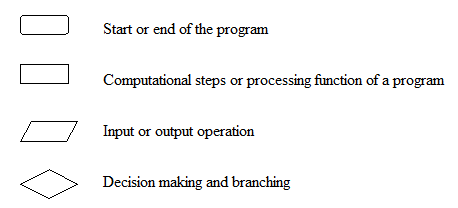

3. With the decision making symbol (diamond) and the process symbol (rectangle), what are the rules for how many lines may enter and leave the symbol.
With the decision making symbol one arrow enters the box but multiple (normally two) can leave. With the process symbol one arrow enters and leaves the box.
4. Study the sample flowcharts then create a flowchart for a coin toss where heads means Mary pays for the pizza and Tales means Bill pays.
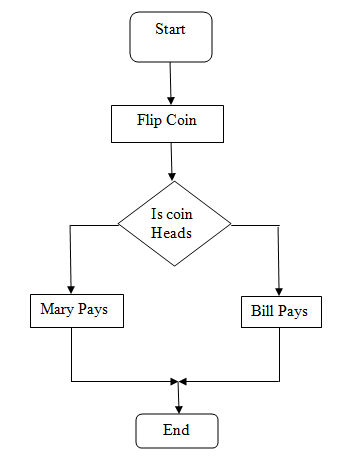
- Example.

- SUM is a variable
- Essentially before 'N' it really says 'let N equal 0'.
What is an Algorithm
1. boil the water,
2. place coffee in the cup,
3. place sugar in the cup,
4. add the boiling water,
5. add milk,
6. stir.
1.Specific
2.correct sequence
Swapping steps would change th end product and this case it wouldn't work at all.
Define Algorithms for the following processes.
Posting a letter.
1.Write Letter
2. Place letter in envelope
3. Write adress of desired place on the front of the envelope.
4. Seal Envelope
5. Stick Stamp on in top right corner
6. Place in post box.
|
Making toast.
1.Place bread in toaster
2.Push down lever to start toasting
3.Wait 2-3 minutes or until toast pops up
4.Place desired topping on toast
|
Calling a friend on the phone
1. Select friend to call
2.Press green call button
3.Wait for answer
4. If phone rings out try steps 1-3 again until friend answers
5.Talk to friend
|
Subscribe to:
Posts (Atom)