1. Discuss what advantages such a system has over pre-electronic methods of organizing and previewing music?
Convenience and access to the database - By having an electronic database it is easier for customers to find a variety of songs conveniently and efficiently. By having a database compared to pre electronic methods customers can type their criteria, single, auburn or demo as opposed to manually searching for it. It is also easier to access via to web which also allows to consumer to purchase the songs from the convenience of their home.
Availability of a song to a consumer- It is much quicker to check for the song you want via a digital system, in this case a database. A database allows to consumer to cut out time that they would normally be looking for a song in a store by just typing the song into the database whether it is available or not.
Organization and layout of the database- having a digital music store is easier to organize. The database is able to be edited in a few clicks, music can be added and track uploaded. The data (songs) can be easily sorted according to the customers wants.
Cost less to the consumer and income to the producer- The music available in a digital database is much cheaper compared to buying a single in a store. This is because it cost less money for the music company to produce the album covers. If a consumer wanted to buy just a single in a music store more than likely they would have to buy the whole album. This is a disadvantage because the consumer is paying money for tracks that they don’t want. With the digital system it allows to consumer to demo the track and buy either the album or single.
Variety of genre, music and bands- By having an online database it allows for more variety and more songs on the database. In traditional music store it may be hard for consumers to find unknown and non main stream songs/ artist/ bands with having the electronic database it allows consumers
2. What ethical / legal issues need to be considered when implementing this database? Explain
The problem of with my database is copy right issues included; track cover and demo of the singles. The prototype database that was created included a short 30secound demo of the track. The copy right laws allow the artist with legal rights to their own work, in this case music and cover album. It is illegal for digital databases to distribute music without the permission of the owner of the copyrighted sound recording. But the online stores do need a licenses from the record labels which would give them permission to distribute their work ( songs ). The data base (company) would also need to ask permission about the album cover and if it can be distributed. The pricing of the music has to be considered also. The pricing of a song track / album has to be ethical for both consumers by making sure it is affordable but that the pricing is also fair that the music producer makes a profit. If the prices of music were overprices consumers may resort to illegal online downloading which in turn looses profit to both the company, producer of the music and the database company . The issue of fair pricing needs to be considered when implementing the database because it could/ may prevent legal issues involving the illegal downloads and the distribution of the music.
5.
Top charts- Allows the consumer to see the top downloaded songs and the top charting songs. It allows suggest music that the consumer may be interested in and also allows the consumer to discover new artist.
Music video- This allows the consumer to see how the artist is able to voice his music through video.
Account access for the public- Allows easier access, premium accounts, faster downloads and chat room. Also increase security because the consumer will have a username and password and their account information will be private and not accessible by the public
Recent downloads- Allows the consumer to see what other people have downloaded. Can lead to new artist that the consumer may not have heard of.
Billing system through their account- Safer for the consumer. By having an account it will be on private meaning that they would be able to buy the music using credit cards or PayPal over to internet. Less chance of hacker and your account information is safe.


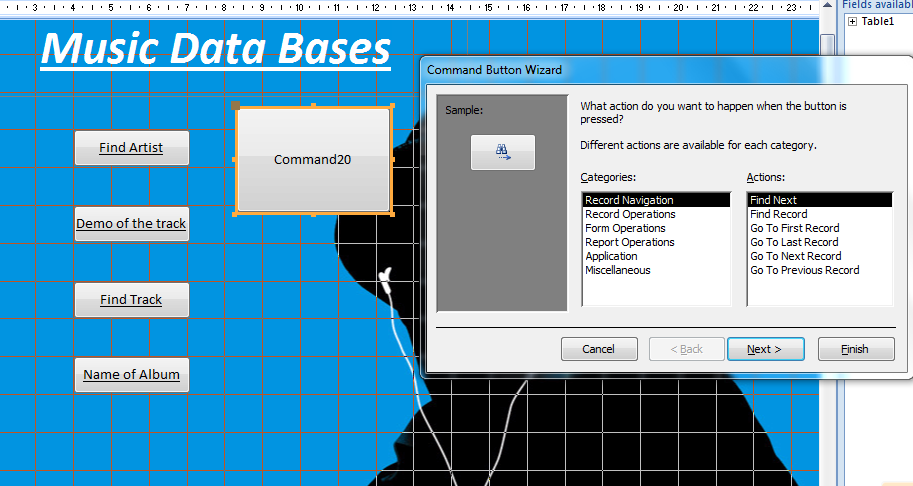


 <-- In this photo i have saved all my music demo in a folder named 'ist' and all i have is put it on the same screen as my data base and drag the music i want into the correct place. This is the simple way to upload music into your data form. To insert a photo it is the exact same procedure.
