Tuesday, May 8, 2012

History of the internet


Some issues we will look at


  • How did the internet originate?
The origin of the internet can be reached as far back as the late 1960s. It was commissioned by the United states governement in collaboration with pricate and commercial interest to build a computer network.  The ancestor of the Internet was the ARPANET, a project funded by the U.S. Department of Defense (DOD) in 1969.

  • Who were the people most responsible for creating it?
ARPANET, science of america and world wide universities.  The project was funded by the us department of defence.
  • What system immediately preceded the internet? What was its purpose?
The Internet was created as a project in 1958 by the United States Government ARPA (The Advanced Research Projects Agency) to network computers in order to gain a technological, and potentially a military advantage over the Soviets in the middle of the cold war.

  • What is an IP packet? What is it comprised of?
An Ip packet is a small black of data that is sent independent. Internet protocol, the method by which information is sent between any two computers on the Internet.
  • What does TCP stand for? How does TCP deal with lost IP packets?
Transmission control protocol: a protocol developed for the internet to get data from one network device to another;
  • Why do computer people like everything in letters?
Technology- Software & Hardware.

Software:

-The QR code generator is an example of a software that was used in the procwess of the self guided smart phone tours. You needed to download the QR code reader to be able to access the software that would inable u to take a photo of the code, which would redirect you to a site that would self guide you around the school.

-Another example of a software that was used in the process of the self guided smart phone tour was the making and production of the website. Students had to create a site using google sites where they were able to edit and upload photos for the tour.

-The teacher also used a site that allowed him to compress all the photos.

Hardware:

- The camera that was used to take the photos
- The smart phone that was used to trail the QR codes.
- The computer that was used to create the QR codes and google site.


Constraints

- Pre download of the Qr scanner app.
- The size of the photos
- Speed of the internet on both computer and phones.
- The direction of the QR codes

Your role in the gorup

- creating half the google sites
- collecting and grouping the photos in order

Probelms you encountered and solution you created

-p= slow internet s= doing it in own time at home
-p= lack of time s= doing it in you own time

Monday, April 2, 2012

ASSSIIGGGNMMMMEENNNNTTTT2222222222222 photos


ASSSIIGGGNMMMMEENNNNTTTT

1.       Discuss what advantages such a system has over pre-electronic methods of organizing and previewing music?

Convenience and access to the database - By having an electronic database it is easier for customers to find a variety of songs conveniently and efficiently. By having a database compared to pre electronic methods customers can type their criteria, single, auburn or demo as opposed to manually searching for it. It is also easier to access via to web which also allows to consumer to purchase the songs from the convenience of their home.

Availability of a song to a consumer- It is much quicker to check for the song you want via a digital system, in this case a database. A database allows to consumer to cut out time that they would normally be looking for a song in a store by just typing the song into the database whether it is available or not.

Organization and layout of the database- having a digital music store is easier to organize. The database is able to be edited in a few clicks, music can be added and track uploaded. The data (songs) can be easily sorted according to the customers wants.

Cost less to the consumer and income to the producer- The music available in a digital database is much cheaper compared to buying a single in a store. This is because it cost less money for the music company to produce the album covers. If a consumer wanted to buy just a single in a music store more than likely they would have to buy the whole album. This is a disadvantage because the consumer is paying money for tracks that they don’t want. With the digital system it allows to consumer to demo the track and buy either the album or single.

Variety of genre, music and bands- By having an online database it allows for more variety and more songs on the database. In traditional music store it may be hard for consumers to find unknown and non main stream songs/ artist/ bands with having the electronic database it allows consumers


2.       What ethical / legal issues need to be considered when implementing this database? Explain

The problem of with my database is copy right issues included; track cover and demo of the singles. The prototype database that was created included a short 30secound demo of the track. The copy right laws allow the artist with legal rights to their own work, in this case music and cover album. It is illegal for digital databases to distribute music without the permission of the owner of the copyrighted sound recording. But the online stores do need a licenses from the record labels which would give them permission to distribute their work ( songs ). The data base (company) would also need to ask permission about the album cover and if it can be distributed. The pricing of the music has to be considered also. The pricing of a song track / album has to be ethical for both consumers by making sure it is affordable but that the pricing is also fair that the music producer makes a profit. If the prices of music were overprices consumers may resort to illegal online downloading which in turn looses profit to both the company, producer of the music and the database company .  The issue of fair pricing needs to be considered when implementing the database because it could/ may prevent legal issues involving the illegal downloads and the distribution of the music.


5.

Top charts- Allows the consumer to see the top downloaded songs and the top charting songs. It allows suggest music that the consumer may be interested in and also allows the consumer to discover new artist.

Music video- This allows the consumer to see how the artist is able to voice his music through video.

Account access for the public- Allows easier access, premium accounts, faster downloads and chat room.  Also increase security because the consumer will have a username and password and their account information will be private and not accessible by the public

Recent downloads- Allows the consumer to see what other people have downloaded. Can lead to new artist that the consumer may not have heard of.

Billing system through their account- Safer for the consumer. By having an account it will be on private meaning that they would be able to buy the music using credit cards or PayPal over to internet. Less chance of hacker and your account information is safe.

To get a perametre query open in a form

1. Click the Microsoft Office Button (upper left corner)
2. Click the Access Options button in the bottom right corner of the menu that appears
3. Click the Current Database category on the left side of the Access Options dialog box
4. Under Application Options section look for the option called "Display Form." Select your form name from the combo box
5. Click Ok to close the Access Options
6. The next time you open the database your form will load on Startup


Monday, March 26, 2012

Using A parameter query

A parameter query enable you to reuse the same query but with different criteria each time. Every time a parameter query is run it prompts the user for the search criteria. This feature allows inexperienced users to query to database without having to actually create the query.

  1. Create a query using the Design View.
  2. In query Design view, drag the fields from the field list to the query design grid.

3.      In the Criteria cell for each field you want to use as a parameter, type an expression with a prompt enclosed in square brackets. To prompt the user for one or more characters to search for, and then find records that begin with or contain the characters the user specifies, create a parameter query that uses the LIKE operator and the wildcard symbol (*).

For example, the following statement searches for words that begin with a specified letter:

LIKE [Enter the first character to search by: ] & "*"

The phrase inside the square brackets is the prompt that the user will see.

The following  statement searches for words that contain the specified character: 


END RESULTS:::::

LIKE "*" & [Enter any character to search by: ] & "*"


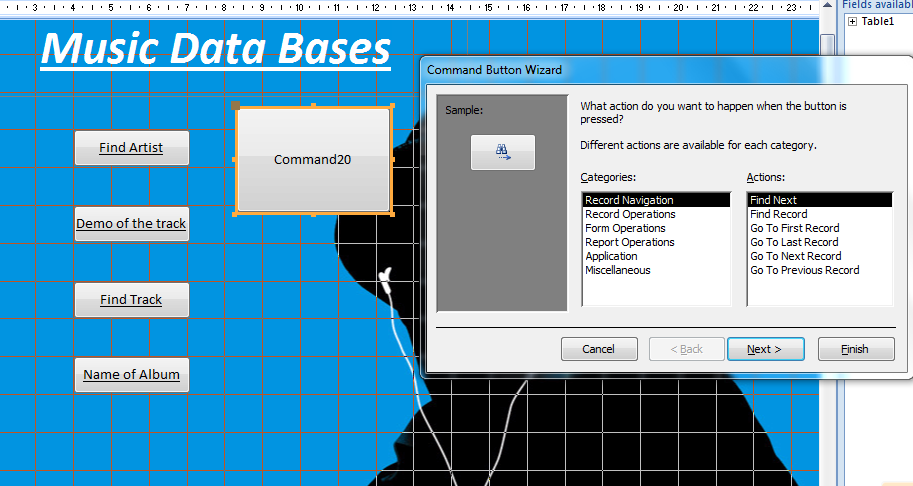
Adding button to a form


  1. Create a form (use the “create” tab then select the form wizard).
  2. Once the form is created, ensure you are in design view then click the design tab.

  1. Click the Button tool.
  2. Click on the form where you want the button to appear.
  3. The window shown below will appear. Select “Miscellaneous” and “Run Query” as shown. Click next.
  4. Select the appropriate query (you have to have made a query before hand). Click next.
  5. Label the button by selecting the text option. Click next.
  6. Name the button command then click finish.
  7. While still in design view create labels for your form using the Aa tool.
  8. You can colour the background by simply right clicking on it and choosing Fill/Back Colour.
  9. Resize and position the queries as required then click save to have them permanently appear in that position each time the button is clicked.